
ROCKIMG
Playful niche tool for creative imagery

Details
- Follow on
- @rockimg_com
- Categories
- Developer ToolsDesign Tools
- Use Cases
- Image GenerationFile Conversion
- Target Audience
- FreelancersIndie HackersDevelopers
- Pricing
- Free
- Platforms
- Web
- Alternative To
 iLoveIMG
About ROCKIMG
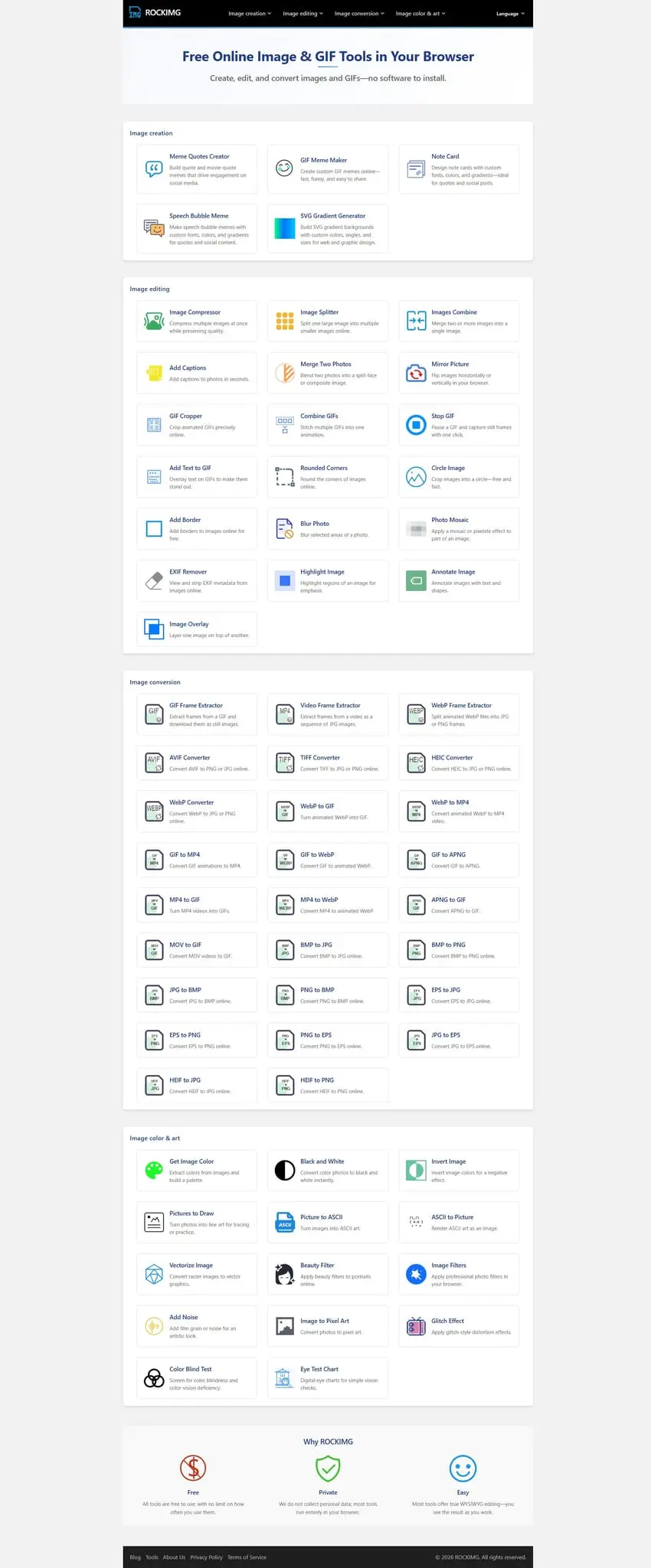
I plan to build a lightweight, niche and entertaining toolkit for image creation and editing. At present, mainstream online image tools focus mostly on basic practical functions like compression, format conversion, cropping and watermark removal, and large websites have mature and powerful products in these fields. Even so, many unique, interesting and niche creative image tools are still missing from the market. Therefore, I hope to design and develop these distinctive small utilities. By providing simple, easy-to-use and original creative image functions, I can help ordinary users break through limitations in picture making, inspire their imagination, and add more interesting and personalized experiences to daily image processing. To realize this vision, I have created the ROCKIMG website, a dedicated platform for niche creative image tools that focuses on user experience and privacy protection. What makes ROCKIMG stand out from other image tool websites is its user-friendly and secure design concept: first and foremost, all tools on ROCKIMG are completely free to use, with no hidden fees or paid subscriptions required. Users do not need to register an account or provide any personal information to access all functions, eliminating the trouble of cumbersome registration processes and allowing everyone to start creating immediately. Privacy protection is another core feature of ROCKIMG. We fully understand the importance of user image privacy, so most image processing is completed locally in the user’s browser—no images or data will be uploaded to our servers. This not only ensures that users’ private photos and creative works are not leaked, but also speeds up the processing speed, allowing users to see the effect in real time. In addition, we adhere to the "what you see is what you get" principle: most tools adopt a two-column layout, with the original image on the left and the edited effect on the right, so users can adjust parameters and view the changes intuitively, making the creation process more efficient and enjoyable. Currently, ROCKIMG has launched several distinctive niche image tools, each designed to meet specific creative needs and bring new fun to image processing. Here are some of our featured products: 1. Meme Quotes Creator (https://www.rockimg.com/meme-quotes.html): This tool allows users to turn photos into shareable quote-style meme images quickly in the browser. You can choose a built-in meme template or upload your own image, select a character or movie still, write quote lines (one sentence per line), and adjust text size, color, and line height to create a realistic screenshot-like quote effect—perfect for social media content and fun sharing. It runs on the front end and does not store any user images. 2. Merge Two Photos (https://www.rockimg.com/merge-two-photos.html): A practical tool for merging and blending two photos side by side online. It splits two images down the middle, suitable for comparisons, portraits, and various creative effects. Users can upload one image for the left and one for the right, adjust the split position with a slider (default 50% for centering), and create a seamless split image. It’s ideal for showing before-and-after changes (makeup, fitness, aging), half-real half-cartoon portraits, or side-by-side comparisons of two people, with tips provided to ensure the merged effect is natural. 3. Stop GIF (https://www.rockimg.com/stop-gif.html): A free online tool that lets users pause any animated GIF at the exact moment they want and save the captured frame as a high-quality PNG image. It supports drag-and-drop uploads, allows previewing the GIF animation, and enables capturing frames by clicking the "Stop" button or the GIF itself. Users can download individual frames or all captured frames as a ZIP package. All processing is done locally in the browser, so no GIF files are uploaded to servers, ensuring complete privacy. 4. Beauty Filter (https://www.rockimg.com/beauty-filter.html): A professional tool for enhancing portraits and selfies. It uses advanced image processing to smooth skin while retaining important facial details, helping users create flawless portraits. Users can upload photos, adjust the smoothing level to control the effect strength, apply the filter, and download the enhanced image. It works best with well-lit portrait photos and supports JPG, PNG, and WebP formats, with all processing completed locally. 5. ASCII to Picture (https://www.rockimg.com/ascii-to-picture.html): This tool converts ASCII text art into shareable images. Users can enter their own ASCII art or select from built-in templates (including animals, flowers, symbols, etc.), customize font size, background color, and text color, then convert the ASCII art into a downloadable PNG image. It’s perfect for turning text-based art into unique graphics, with tips to ensure the best conversion effect, such as using monospaced ASCII art with consistent line lengths.
Product Insights
ROCKIMG is a web-based suite of niche image editing utilities designed for local, browser-side processing without mandatory account registration. It focuses on privacy-first creative workflows including meme generation and photo merging for social sharing.
- Privacy-focused local execution where images remain in the browser without server uploads.
- Completely free pricing model with no hidden fees or registration requirements.
- Dual-column real-time editing interface for intuitive visual feedback.
- Focused on niche creative utilities like movie-style meme quote generation.
Ideal for: Freelancers, indie hackers, and developers who need quick, privacy-conscious image editing tools without the friction of creating accounts.
ROCKIMG serves as a privacy-focused and creative-oriented alternative to general-purpose image editors like iLoveIMG.
Screenshots
Reviews (0)
No reviews yet. Be the first to rate this product!
Comments (1)
This website features a variety of fun tools, such as 'Merge Two Photos Side by Side'. I often use it to create comparison images, and the results work really well.