
DraftPDF
A free browser-based PDF editor
Details
- Target Audience
- FreelancersSmall BusinessesAEC Firms
- Pricing
- Subscription
- Platforms
- Web
- Featured in
- Best Tools for AEC Firms
About DraftPDF
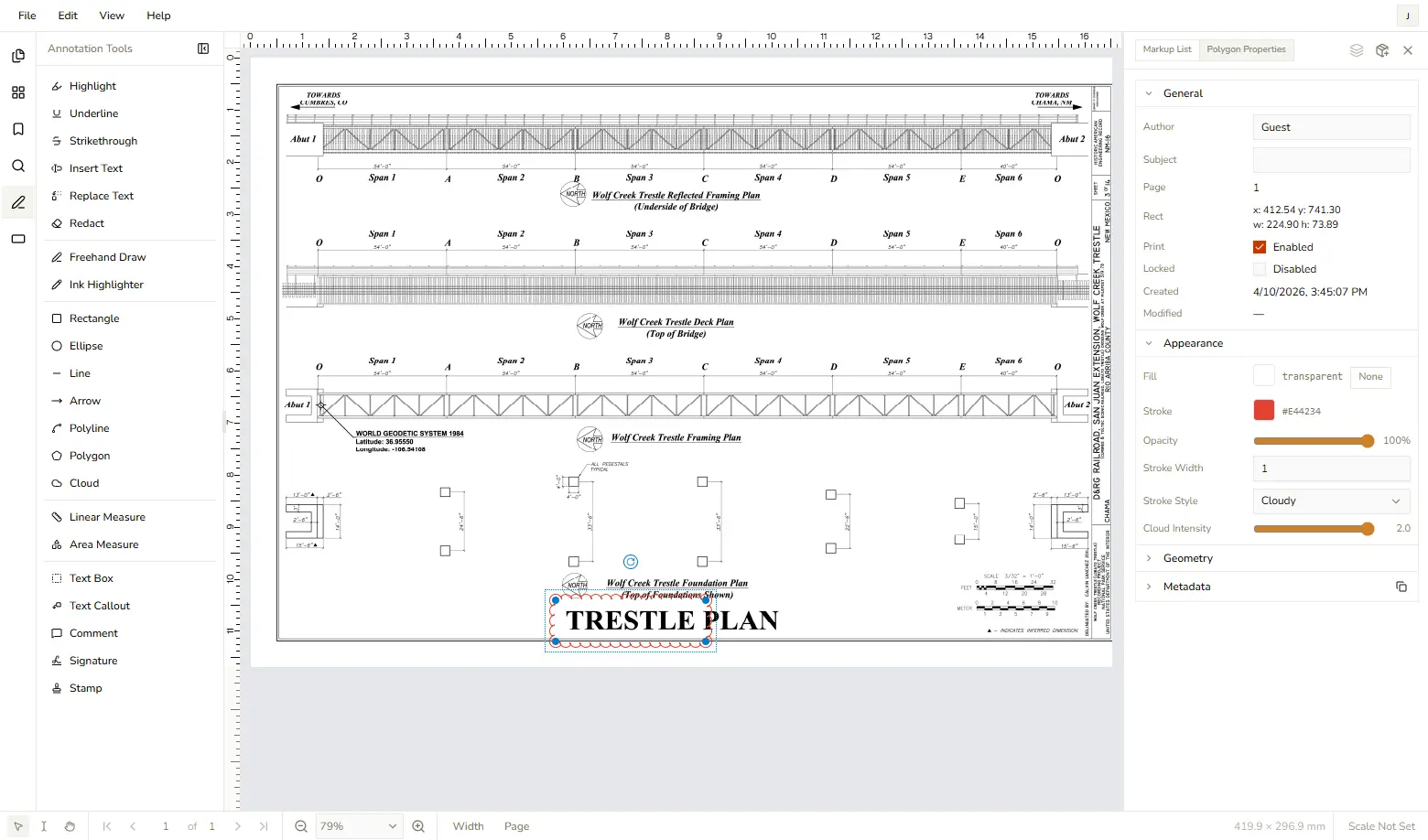
DraftPDF is a free, privacy-first PDF editor that runs entirely inside your web browser. No installs. No uploads. Just open a PDF and get to work. Most "online PDF tools" are really just file upload portals — you hand over your document, wait for a server to chew on it, and hope your data doesn't end up somewhere you didn't intend. DraftPDF is different. It runs on WebAssembly using PDFium — the same battle-tested PDF engine inside Google Chrome — which means all processing happens locally on your device. Your files never leave. Not even a little bit. Additionally, most online PDF tools are a collection of micro-tools. There is a merge tool, a split tool, a bookmark tool, etc. DraftPDF takes a different approach. It is a full-featured document editor in the same league as Bluebeam Revu, Foxit PDF Editor, and Adobe Acrobat Pro. If you've used any of those, DraftPDF will feel right at home: a familiar menubar layout, a rich toolbar, collapsible panels, keyboard shortcuts, undo/redo history, and multi-document support all come standard. Whether you're marking up a contract, reviewing engineering drawings, or collaborating on a report, DraftPDF has the annotation tools you need: Text markup: Highlight, underline, and strikethrough text — plus insert and replace text comments inline. Drawing tools: Freehand ink, ink highlighter, rectangles, ellipses, lines, arrows, polylines, polygons, and cloud-style shapes. Text annotations: Text boxes, callouts, sticky-note comments, and stamps from a customizable library. Signatures: Draw or type your signature and initials, then save them for reuse across documents. Redactions: Permanently black out sensitive content before sharing — burned in, irreversible, and thorough. Annotation appearances are fully customizable — colors, line weights, opacity, fonts — and you can set per-tool defaults so your preferences stick across sessions. Working with architectural plans, engineering drawings, or scaled diagrams? DraftPDF includes calibrated measurement tools. Set a custom scale (or pick from common engineering and architectural presets), then use the linear and area measurement tools to take precise real-world measurements directly on the page. Scale labels appear right on the annotation. DraftPDF handles PDF forms on both ends. Fill out existing form fields interactively — text inputs, checkboxes, radio buttons, dropdowns, and list boxes all work as expected. Need to build a form from scratch? Switch to form design mode and add fields anywhere on the page. Manage pages like a pro. Insert pages from another PDF at any position Insert blank pages in standard or custom sizes Delete individual pages or page ranges Rotate pages independently or all at once Merge multiple PDFs by opening files side-by-side Reorganize your document with a live thumbnail panel Headers, footers, bookmarks, and more Add custom headers and footers with page numbers, dates, Bates numbering, and freeform text across any page range. Manage document bookmarks with a full tree editor. Edit file metadata. Password-protect your documents before sharing. Flatten annotations into the page content permanently when you're done reviewing. DraftPDF is designed for people who work with PDFs seriously, such as engineers, architects, lawyers, designers, project managers, but without the overhead of enterprise software. There's nothing to install, configure, or license. Open your browser, open your file, and you're in. When you're done, download your edited PDF directly to your device. The core editor is and will always be free. DraftPDF is built on the principle that you shouldn't have to pay for basic document tools or surrender your files to a cloud service just to highlight a sentence or sign a contract. Your documents are yours — and with DraftPDF, they stay that way. Try DraftPDF now at DraftPDF.com
Product Insights
DraftPDF is a web-based document editor that utilizes local WebAssembly processing to provide professional-grade PDF manipulation without file uploads. It combines comprehensive annotation, form design, and page management tools into a single browser interface.
- Privacy-first architecture with local file processing via WebAssembly
- Professional feature set including calibrated measurement tools for AEC firms
- Complete form lifecycle support including interactive filling and form design
- Advanced document management with Bates numbering and header/footer customization
Ideal for: Freelancers, small businesses, and AEC firms seeking a secure browser-based solution for document markup, engineering measurements, and form creation.
Screenshots
Reviews (0)
No reviews yet. Be the first to rate this product!
Comments (0)
No comments yet. Be the first to share your thoughts!