
LinkSphinx
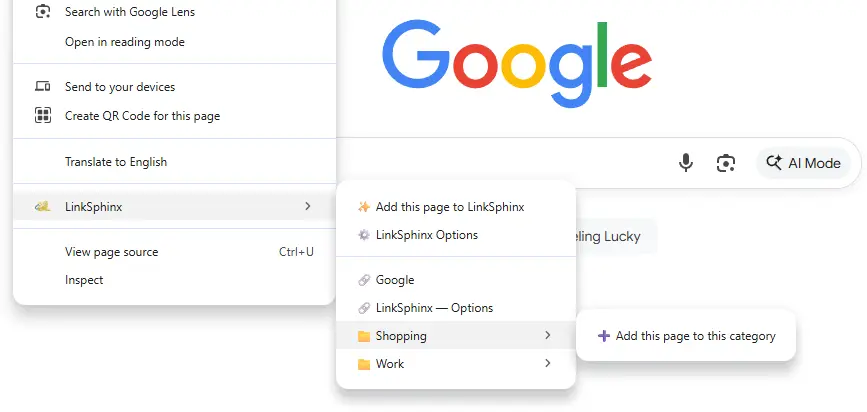
A better, faster bookmark system on right click

Details
- Categories
- Developer ToolsAutomation & Workflow
- Target Audience
- DevelopersFreelancersNon-Technical Users
- Platforms
- Web
About LinkSphinx
Right-click to capture the page you’re on and file it into tidy categories. Reopen anything straight from the context menu, fast, organized, frictionless. Easily search through all your links by title, category, or URL and add/remove categories and change the order. Keep your links separate from your regular bookmarks or import all your bookmarks to LinkSphinx.
Product Insights
LinkSphinx integrates link management directly into the web browser's context menu, providing a dedicated space for organizing and retrieving URLs across various categories. The system supports full-text search and bookmark importation to streamline digital storage and documentation workflows.
- Context menu integration for rapid link capture and retrieval via right-click.
- Integrated search functionality for filtering links by title, category, or URL.
- Customizable organizational structure allowing for category reordering and removal.
- Flexible storage options to keep links separate or import existing browser bookmarks.
Ideal for: Developers, freelancers, and non-technical users can leverage LinkSphinx to build organized knowledge bases and automate their URL storage workflows.
Screenshots

Reviews (0)
No reviews yet. Be the first to rate this product!
Comments (1)
Excited to share something I built and use every day myself, right click and open any of your links you've saved. I hated scrolling through and searching for my bookmarks and having to click the tiny bookmark button, do it all with a right click.