📸 Ultimate Screenshot
Transform any webpage into screenshots, PDFs, videos, or GIF


Details
- Follow on
- @DZ_45Omar
- Target Audience
- DevelopersQA EngineersContent Creators
About 📸 Ultimate Screenshot
Here's a condensed version of your README: 🚀 Transform any webpage into high-quality screenshots, PDFs, or engaging videos/GIFs with our powerful web capture tool. Perfect for web monitoring, content creation, documentation, and automated testing. ✨ Key Features: 📸 Multiple output formats (PNG, JPEG, PDF, MP4, GIF) 📱 100+ device presets (iPhone, iPad, Android, tablets) 📄 Full-page capture beyond viewport 🎬 Video recording with custom frame rates 🌐 Proxy support and cookie management 📋 Advanced PDF generation with custom margins 🎯 Use Cases: 👀 Website monitoring and competitor analysis 📱 Responsive testing across devices 📚 Tutorial creation and documentation 📲 Social media content generation 💰 Price monitoring and research 🔧 Automated testing integration ⚡ Built on Apify platform for reliable, scalable web automation. Categories: I'd suggest: 🛠️ Developer Tools (primary) ⚙️ Automation & Workflow 📊 Analytics & Monitoring 🎨 Design Tools 🔧 No-Code / Low-Code
Product Insights
Ultimate Screenshot provides a web-based automated capture solution that outputs webpages as high-quality images, PDFs, videos, or GIFs via the Apify platform. It bridges the gap between manual UI testing and automated documentation by supporting over 100 device presets and advanced proxy configurations.
- Supports diverse output formats including PNG, JPEG, PDF, MP4, and GIF.
- Features over 100 device presets for comprehensive mobile and tablet responsive testing.
- Includes advanced capture capabilities like full-page documentation, custom margins, and cookie management.
- Built on the Apify platform for scalable automation and programmatic API access.
Ideal for: Developers, QA Engineers, and Content Creators can use this tool to automate responsive testing, generate documentation, or perform competitor analysis through precise web captures.
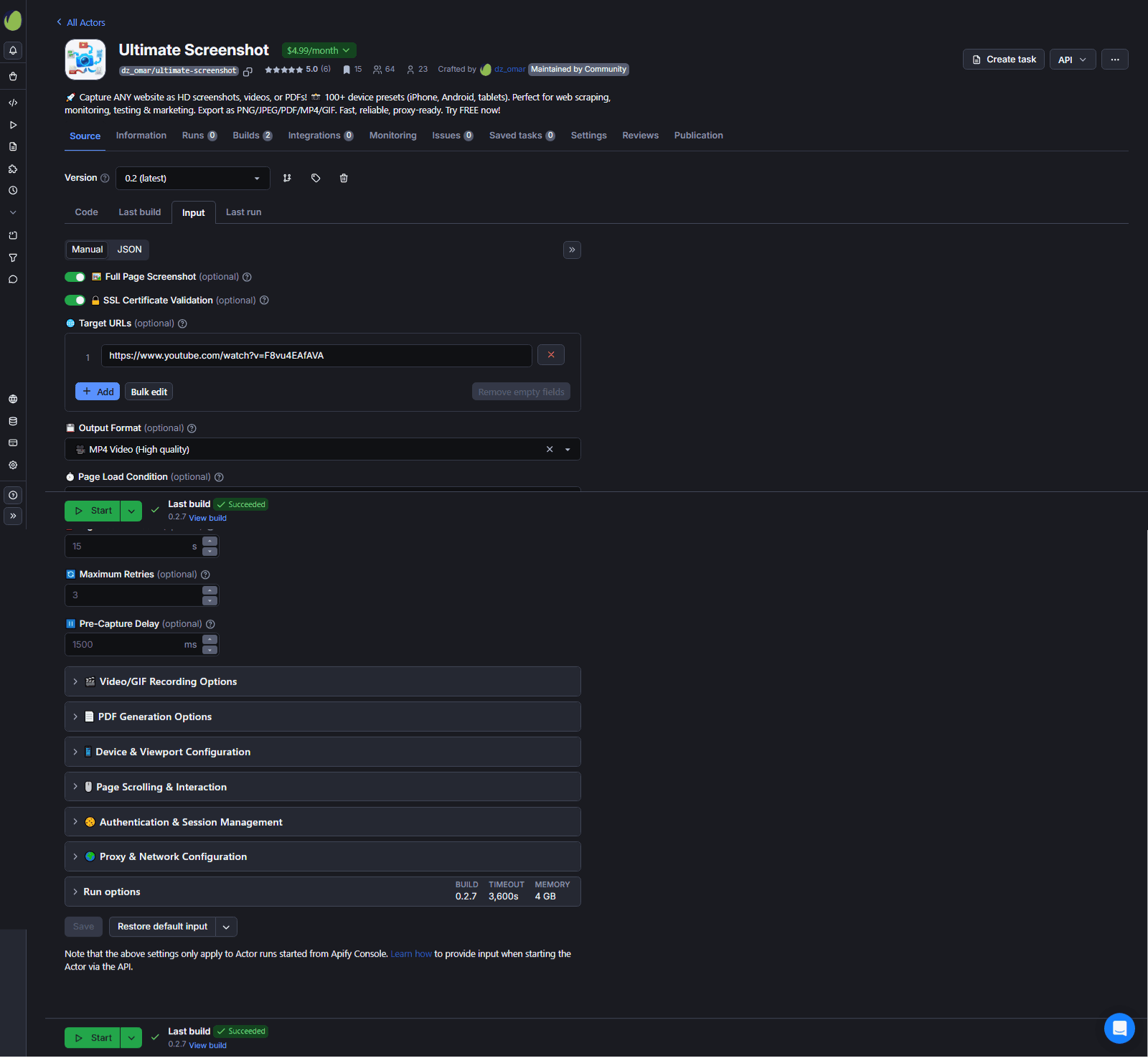
Screenshots
Product Updates (0)
No updates yet. Check back later for updates from the team.
Reviews (0)
No reviews yet. Be the first to rate this product!
Comments (0)
No comments yet. Be the first to share your thoughts!