

Team Collaboration

Find the best tools and products for team collaboration. Compare solutions, see real user feedback, and discover products that fit your workflow.

NotesnChat
NotesnChatAd

Be Organized. Stay Connected.

Published Today

CountTogether

CountTogether

Shared counters on steroids

1PeerPush

Published Yesterday

StratlyPulse

StratlyPulse

Turn marketing ideas into executable roadmaps with AI

1PeerPush
🔥Trending
Spots App

Spots App

Resource booking for hybrid teams to manage office space

1PeerPush
🔥Trending
-100% OFF
2
Find Boxes

Find Boxes

AV inventory and project management software

1PeerPush
🔥Trending

Published This Week

Aldoo Meet

Aldoo Meet

Easy video conferencing for teams and organizations
41PeerPush
🔥Trending
BRCKS

BRCKS

Project management software for UK residential builders

1PeerPush
🔥Trending
1
Geekflare Chat

Geekflare Chat

All-in-one AI workspace for teams

1PeerPush
🔥Trending
2
Converge

Converge

Website chat widget and unified support inbox for businesses
1PeerPush
🔥Trending
2
SimpliHome

SimpliHome

Keep your whole household in sync with one simple system

1PeerPush
🔥Trending
3
Kanban AI

Kanban AI

AI kanban boards and sprint planning for builders

2PeerPush
🔥Trending
4
Weqly

Weqly

The easiest way to schedule shifts and manage calendars
1PeerPush
🔥Trending
1
KIBAKO

KIBAKO

Turn your ideas into a board game prototype online

1PeerPush
2
Kontu.io

Kontu.io

Simple money planning and project budgeting
1PeerPush
🔥Trending
2
ClientProof

ClientProof

Client delivery hub for agency milestones and approvals

1PeerPush
🔥Trending
1
dMaya

dMaya

AI vibe design platform for professional teams

2PeerPush
2
Project Planning Templates

Project Planning Templates

Download practical, ready-to-use project planning templates

1PeerPush
1
$100MRR
Hisab

Hisab

Split bills and shared expenses with clear balances

1PeerPush
1
Rapidly

Rapidly

Peer-to-peer file transfers in your browser

1PeerPush
1
Grunnaro

Grunnaro

A project tool for the Grunna way of working

24PeerPush
1
ClashGrid

ClashGrid

Connect Beyond Work

1PeerPush
Gruplato

Gruplato

Plan trips with friends and coordinate together

1PeerPush
HiOffice

HiOffice

Virtual office and collaboration for remote teams
1PeerPush
TimeIsMeeting

TimeIsMeeting

Calculate and share the hourly cost of your meetings

1PeerPush
$50MRR
Collie

Collie

The pet care app for households

16PeerPush
🔥Trending
AnimoVamos

AnimoVamos

Find pickup matches and book quality sports fields

1PeerPush
1
Creyater

Creyater

Explore startup ideas and connect with creators

1PeerPush
Pomodoro Cowork

Pomodoro Cowork

cowork online pomodoro timer timetracker productivity

1PeerPush
-100% OFF
1
$0MRR
HeyAurora

HeyAurora

Delegate Instagram DMs without sharing your password
1PeerPush
1
RawRebelSocial

RawRebelSocial

RawRebelSocial is a music-focused social platform
1PeerPush
2
GenPlace ai

GenPlace ai

A collaborative AI canvas for a shared live world
1PeerPush
1
Syntra

Syntra

Connecting people, instantly.

1PeerPush
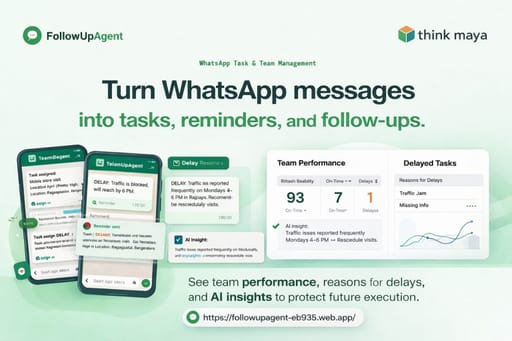
FollowUpAgent

FollowUpAgent

Happy tasking

1PeerPush
1
MSpark

MSpark

Connect worldwide with video calls and random chat

1PeerPush
1
Oi

Oi

One shared AI setup for your team

40PeerPush
🔥Trending
4
VoltStrategist

VoltStrategist

Online business simulation strategy game

1PeerPush
1
WorklineIQ

WorklineIQ

Field data and office management for utility contractors

2PeerPush

Published This Month

Peeqback

Peeqback

Turn scattered user feedback into clear product decisions
1PeerPush
🔥Trending
1
Moneko

Moneko

AI budgeting and expense tracking across mobile and chat
1PeerPush
2
Assentia

Assentia

Website feedback designed to protect your scope

1PeerPush
🔥Trending
2
SQL Designer

SQL Designer

Free and Open Source ERD tool for MySQL and Postgres

1PeerPush
1
$0MRR
Sanctuary

Sanctuary

Cloud-native worship presentation platform

1PeerPush
🔥Trending
5
Lead-well

Lead-well

AI leadership reflection tool for managers

1PeerPush
🔥Trending
3
AANCALL

AANCALL

Reliable hosted PBX solutions and business phone systems

1PeerPush
🔥Trending
2
AI Party Finder

AI Party Finder

Find gaming teammates with AI-powered matchmaking
1PeerPush
🔥Trending
2
1
KnowledgeLM

KnowledgeLM

AI-powered knowledge base and wiki for teams

1PeerPush
1
Online Whiteboard

Online Whiteboard

A free online whiteboard for your browser

11PeerPush
🔥Trending
2
Kaila OS

Kaila OS

AI-powered meeting preparation and rehearsal
1PeerPush
🔥Trending
3
TendTo.ai

TendTo.ai

Coordinate care for loved ones in one central place

2PeerPush
🔥Trending
3
1
Focus Quadrant

Focus Quadrant

The Eisenhower Matrix task manager for better decisions

3PeerPush
🔥Trending
5

Team collaboration software provides digital environments where groups synchronize tasks, communicate across time zones, and manage shared resources. The best options offer seamless integration between task management and real-time communication to reduce context switching. High-performing teams select these platforms to centralize knowledge and automate repetitive administrative workflows.

Effective collaboration requires a balance of asynchronous documentation and synchronous interaction. Solutions in this category provide structured environments for decision making, sentiment tracking, and strategic planning. These web and mobile applications facilitate transparency by ensuring every contributor has access to the most recent updates and project milestones without manual follow ups.

Modern systems prioritize user experience to encourage widespread adoption across diverse technical skill levels. Premium features often include generative capabilities and advanced sentiment analysis to maintain group health and project momentum. Choosing the right environment depends on whether your workflow favors lightweight mobile coordination or robust web based technical planning.


What to look for

  • Prioritize platforms that offer native mobile and web support to ensure your team remains connected while on the move.
  • Verify the presence of automated features that handle repetitive tasks like reminders or status updates without manual intervention.
  • Select solutions that match your specific organizational structure, whether that involves structured question formats or visual planning boards.
  • Evaluate the tiers of service to ensure the free and paid versions align with your long term scaling requirements.
  • Assess the quality of real time synchronization to prevent data conflicts when multiple users edit shared documents simultaneously.
  • Look for sentiment analysis or health monitoring features that help prevent burnout and maintain positive group dynamics.

Frequently asked questions

Which features define top tier team collaboration software?
Leading solutions excel by providing a centralized location for task tracking, file sharing, and instant communication. They often include automated reminders and sentiment monitoring to ensure projects stay on track. High quality applications also provide cross platform support, allowing team members to transition between desktop and mobile environments without losing context or functionality.
How do I choose between free and paid collaboration versions?
Professional teams should examine the limitations of free versions, specifically regarding storage and advanced automation. While free tiers are excellent for testing core workflows, paid subscriptions usually provide the enhanced security and deeper integrations necessary for scaling business operations. Focus on the value provided by automated workflows rather than simple seat counts.
Can mobile apps effectively manage complex team workflows?
Modern mobile applications are designed to handle urgent updates and notifications, though complex planning often requires the desktop web interface. Top tools ensure that mobile users can respond to prompts, view status changes, and contribute to discussions immediately. This accessibility is vital for distributed teams who require constant connectivity across different environments and locations.
Why is sentiment tracking important in collaborative environments?
Monitoring team sentiment helps leaders identify potential fatigue or roadblocks before they impact project timelines. By using software that tracks well being and engagement, organizations can maintain a healthy work culture and reduce turnover. This proactive approach to team management ensures that productivity remains high while preventing burnout among individual contributors.
Do these tools support specialized sectors like education or development?
Many collaboration platforms offer specialized features tailored for niche workflows, such as automated feedback loops for educators or technical hubs for developers. These environments provide specific structures for marking, code review, or financial analysis alongside general communication tools. Selecting a specialized platform ensures that the interface matches the unique vocabulary and requirements of your industry.
What is the best tool for Team Collaboration?
The best tool for Team Collaboration depends on your workflow, team size, and budget. Consider how the tool integrates with what you already use, how quickly you can onboard, and whether it supports the specific outcomes you care about.
How do I choose a Team Collaboration tool?
Start by listing the concrete problems you want solved and match them against each tool's core strengths. Look at documentation quality, community support, and pricing fit. Trial the top two or three before committing.
Are there free options for Team Collaboration?
Free and freemium tools for Team Collaboration exist alongside paid and subscription products. Free tiers are a good way to validate fit before upgrading; check usage limits and export policies so you are not locked in.