
atrium
Shared development environment for humans and agents
Details
- Follow on
- @atrium_dev
- Categories
- Developer Tools
- Target Audience
- Software DevelopersAI EngineersAI-Native Engineers
- Pricing
- Free
- Platforms
- Desktop
- Alternative To
 Warp
Warp
About atrium
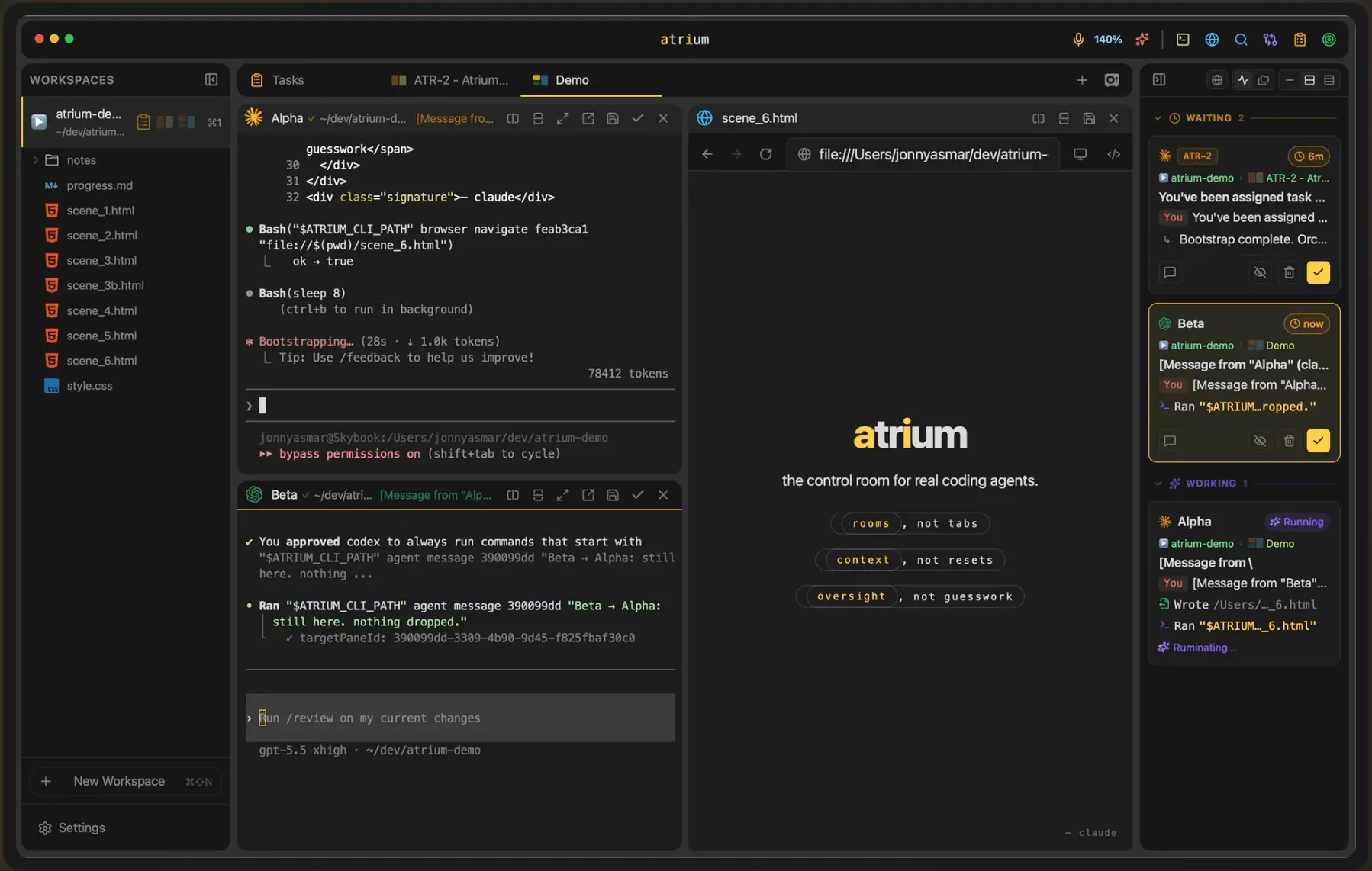
atrium is a native macOS workspace for running multiple CLI AI coding agents — Claude Code, Codex CLI, Gemini CLI, Cursor CLI, Aider, Cline — side-by-side in a tiling pane layout. Each pane can hold an agent, an embedded web browser, a markdown notes canvas, or a code editor. The entire workspace state persists through crashes and reboots because the data directory is a git repository. Built for the workflow no terminal multiplexer is optimized for: developers running 3-6 parallel AI coding agents on different repos and problems, losing context every time iTerm crashes or a system update reboots their machine. What atrium does specifically: - Spawns and resumes long-running CLI agents in tiled panes. Each agent gets its own persistent session with full history. Survives `cmd+q`, `kill -9`, and unexpected reboots. - Git-backed state recovery: every workspace change is a commit. Force-killing the app and reopening it restores every agent, pane, browser tab, and note to its exact prior state. - Embeds a real web browser as a first-class pane type. Read docs, watch a YouTube tutorial, or check a PR while an agent works alongside. - Markdown canvas pane with a built-in editor for scratch notes, agent prompts, or in-progress drafts. Notes are persisted in plain markdown on disk — no proprietary format. - Full code editor pane (Monaco-based) for direct file editing without leaving the workspace. - Comprehensive CLI: any pane, agent, browser, note, room, or task can be controlled from a script or another agent. atrium can drive itself. - Desktop notifications when an agent needs input or finishes a long task. No more cmd-tabbing every two minutes to check on Claude Code. Real workflow examples: - Run 4 Claude Code sessions on 4 different repos. See them all at once. Get notified when any one needs review. - Have an agent generate code in one pane while you read the official docs in the browser pane next to it. - Stack a markdown canvas with your architecture notes alongside the agent implementing the feature. - Use the CLI to spawn an agent, hand it a task, and walk away. atrium notifies you when it's done. Alternative to: tmux, iTerm2, Warp, Cursor (single-window mode), Cline. atrium is built specifically around the assumption that you're running multiple coding agents in parallel — not just multiple terminal sessions. Constraints, honestly stated: - macOS only. The browser pane, NSEvent integration, and global keybindings depend on AppKit/WKWebView APIs without clean Linux/Windows equivalents. A real port is on the roadmap, not imminent. - Solo dev, ~4 months in. Active development with a release every few days. Bugs exist. - Free during early access. Not monetized yet — figuring out what's worth charging for once the workflows settle. Stack: Tauri + Rust + React. Feedback welcome at https://getatrium.dev or @atrium_dev on X.
Product Insights
atrium provides a native macOS workspace designed to run multiple CLI AI coding agents simultaneously using a tiled layout and git-backed state persistence. It integrates terminal sessions with an embedded browser, markdown notes, and a code editor to prevent context loss during system reboots.
- Git-backed state recovery ensures all agent sessions and panes survive crashes or reboots.
- Supports side-by-side execution of different CLI agents like Claude Code, Aider, and Cline.
- Native macOS integration provides desktop notifications when agents complete tasks or require input.
- Includes built-in web browser and markdown editor panes for centralized documentation and note-taking.
Ideal for: Software Developers and AI-Native Engineers who need to manage multiple parallel AI coding agents across different repositories without losing session history.
This tool serves as an alternative to terminal multiplexers and AI-integrated editors like Warp.
Product Video
Watch a video demo of atrium.
Screenshots
Reviews (2)
Average 5.0 out of 5
Based on 2 reviews

5 star tool, super easy to use and very nice
Comments (0)
No comments yet. Be the first to share your thoughts!